Lexmark X642e Guida Utente Pagina 159
- Pagina / 191
- Indice
- RISOLUZIONE PROBLEMI
- SEGNALIBRI


- X642e Laser MFP 1
- Edition: May 2006 2
- Trademarks 2
- Safety information 2
- Mercury statement 3
- Static sensitivity notice 3
- Contents 4
- Learning about the MFP 9
- Using the scanner 11
- Configured models 13
- Status Indicates 15
- Sample screen three 22
- Displaying 1-4/5 22
- Other touch-screen buttons 25
- Features 26
- Quick copy 28
- Multiple page copying 29
- Making transparencies 32
- Copying to letterhead 32
- Copying photographs 33
- Copying mixed-sized media 34
- Reducing and enlarging copies 35
- Setting the duplex option 35
- Adjusting copy quality 36
- Setting collation options 36
- Setting paper saving options 37
- Canceling a copy job 38
- Copy tips 39
- Entering an e-mail address 41
- Using a shortcut number 41
- Using the address book 41
- E-mailing to a profile 42
- Changing the output file type 43
- E-mailing color documents 43
- Creating an e-mail shortcut 44
- Creating an e-mail profile 45
- Canceling an e-mail 45
- Understanding e-mail options 46
- E-mail server setup 47
- Address book setup 47
- E-mail tips 48
- Sending a fax 50
- Sending faxes from a computer 51
- Creating shortcuts 52
- From the MFP 53
- Understanding fax options 54
- Changing the fax resolution 55
- Sending a fax at a later time 56
- Cancel an outgoing fax 57
- Fax tips 57
- Fax setup 58
- Performing browser fax setup 59
- Viewing a fax log 59
- Entering the FTP address 60
- FTP options 62
- FTP tips 63
- Create a scan to PC profile 64
- Custom Photo - Color JPEG 66
- Photo - Gray TIFF 66
- Scanning tips 67
- Printing 68
- Canceling a print job 70
- Æ Settings Æ Control 71
- Printing a network setup page 72
- Printing a font sample list 73
- Printing a directory list 73
- Æ Print 74
- Æ Print Time Filters 74
- Æ Print 76
- Printing on specialty media 77
- Æ Page Setup 78
- Size indicators 80
- Insert the tray into the MFP 82
- Simplex 84
- Envelope 84
- 5 Load the media in the tray 85
- Simplex (single sided) Duplex 86
- Loading the 2000-sheet drawer 87
- 4 Close the loading door 89
- Loading the envelope feeder 90
- Linking trays 93
- Supported print media 94
- Print media sizes 95
- Print media sizes(continued) 96
- Print media types 97
- Print media weights 98
- (110 lb) 163 g/m 98
- Selecting print media 101
- Envelopes 103
- 1 Print five sheets of paper 104
- Card stock 105
- Storing print media 106
- Avoiding jams 106
- Installing input options 108
- Installing a duplex unit 111
- Square hole 112
- Round peg 112
- Set the shield aside 117
- Installation 118
- Installing an option card 122
- Replacing the shield 123
- Understanding the MFP 124
- E-mail FTP 125
- Status/ Supplies Cancel Jobs 125
- Conserving supplies 126
- Ordering supplies 126
- For the USA and Canada 127
- For the Asia Pacific Region 128
- For Latin America 128
- Ordering a maintenance kit 129
- Recycling Lexmark products 131
- Scanner registration 132
- 9 Press Start 133
- Moving the MFP 134
- Administrative support 135
- Adjusting screen timeout 136
- Adjusting Power Saver 136
- Configuring the MFP 136
- Restricting Function Access 137
- Æ Analog Fax Setup 138
- Setting the Advanced Password 139
- Using the secure EWS 140
- Disabling SNMPv1 and SNMPv2 141
- 6 Click Submit 142
- Disabling ports and protocols 143
- Using 802.1x Authentication 143
- Confidential Print Setup 144
- Clearing jams 146
- Access doors and trays 147
- Understanding jam messages 148
- 1 Lift the envelope weight 149
- 2 Remove all envelopes 149
- Flex and stack the envelopes 150
- Load the envelope feeder 150
- Adjust the guide 150
- Lower the envelope weight 150
- Touch Continue 150
- 2 Open the duplex tray 151
- Elevator button 153
- 7 Close the top front cover 155
- 2 Open the MFP rear door 156
- 3 Remove the jammed media 157
- 4 Close the rear door 157
- 5 Touch Continue 157
- 1 Open the duplex rear door 158
- 2 Remove the jammed media 158
- 4 Touch Continue 158
- Clearing ADF Jams 159
- Troubleshooting 160
- Solving printing problems 161
- Solving copy quality problems 164
- Solving scan quality problems 164
- Solving fax problems 164
- Solving option problems 165
- Solving paper feed problems 168
- Print quality troubleshooting 170
- . Repeat this 171
- Conventions 176
- Electronic emission notices 176
- ÅëëçíéêÜ 178
- Using this product in Germany 183
- Noise emission levels 184
- ENERGY STAR 185
- Laser advisory label 185
- Laser notice 186
- Numerics 187
Prodotti e manuali riguardandi Apparecchi multifunzione Lexmark X642e
 (2 pagine)
 (46 pagine)
(371 pagine)
(338 pagine)
(46 pagine)
(371 pagine)
(338 pagine)
Rice Lake CB-2 Concrete Batch Controller Version 1.0 manuali
Manuali dei proprietari e guide per l'utente per Bilance Rice Lake CB-2 Concrete Batch Controller Version 1.0.
We fornisce 1 manuali pdf Rice Lake CB-2 Concrete Batch Controller Version 1.0 per scaricare gratuitamente in base al tipo di documento: Manuale Utente
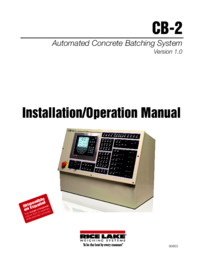
Rice lake CB-2 Concrete Batch Controller Version 1.0 Manuale Utente (60 pagine)
Marchio: Rice-lake | Categoria: Scales | Dimensione: 9.54 MB |
Indice
Più prodotti e manuali per Bilance Rice Lake
| Modelli | Tipo di Documento |
|---|---|
| CB-2 Concrete Batch Controller Version 2.0 |
Manuale Utente
Rice Lake CB-2 Concrete Batch Controller Version 2.0 User Manual,
91 pagine
|
| Chair Scales |
Manuale Utente
Rice Lake Chair Scales User Manual,
32 pagine
|
| Static Weighing |
Manuale Utente
Rice Lake Static Weighing User Manual,
78 pagine
|
| CLS-420 Cargo Lift Scale - Bluetooth Option |
Manuale Utente
Rice Lake CLS-420 Cargo Lift Scale - Bluetooth Option User Manual,
6 pagine
|
| CLS-420 Cargo Lift Scale Installation Manual |
Manuale Utente
Rice Lake CLS-420 Cargo Lift Scale Installation Manual User Manual,
66 pagine
|
| CLS-420 Cargo Lift Scale Operator Card |
Manuale Utente
Rice Lake CLS-420 Cargo Lift Scale Operator Card User Manual,
2 pagine
|
| CLS-420/420Plus WLAN |
Manuale Utente
Rice Lake CLS-420/420Plus WLAN User Manual,
8 pagine
|
| Lift Truck/Pallet Jack Scales - CLS-Series |
Manuale Utente
Rice Lake Lift Truck/Pallet Jack Scales - CLS-Series User Manual,
46 pagine
|
| CLS-920 WLAN Option |
Manuale Utente
Rice Lake CLS-920 WLAN Option User Manual,
14 pagine
|
| CLS-920i Cargo Lift Scale Daily Operator Card |
Manuale Utente
Rice Lake CLS-920i Cargo Lift Scale Daily Operator Card User Manual,
7 pagine
|
| CLS-920i Cargo Lift Scale Installation Manual |
Manuale Utente
Rice Lake CLS-920i Cargo Lift Scale Installation Manual User Manual,
98 pagine
|
| Coil Scale RoughDeck CS |
Manuale Utente
Rice Lake Coil Scale RoughDeck CS User Manual,
15 pagine
|
| Coin Counting Scales |
Manuale Utente
Rice Lake Coin Counting Scales User Manual,
2 pagine
|
| Retail Scales - MajorSlice 300M |
Manuale Utente
Rice Lake Retail Scales - MajorSlice 300M User Manual,
30 pagine
|
| Retail Scales - MajorSlice 350A |
Manuale Utente
Rice Lake Retail Scales - MajorSlice 350A User Manual,
37 pagine
|
| Retail Scales - MajorSlice 350M |
Manuale Utente
Rice Lake Retail Scales - MajorSlice 350M User Manual,
32 pagine
|
| Food Equipment - Rice Lake MajorSlice Deli Slicer |
Manuale Utente
Rice Lake Food Equipment - Rice Lake MajorSlice Deli Slicer M300 Cleaning Placard User Manual,
2 pagine
|
| Retail Scales - Rice Lake MajorSlice Series Deli S |
Manuale Utente
Rice Lake Retail Scales - Rice Lake MajorSlice Series Deli Slicer Safety Placard User Manual,
1 pagine
|
| Condec 3030 |
Manuale Utente
Rice Lake Condec 3030 User Manual,
46 pagine
|
| Contego-Hygienic Weigh Module Kits, Lateral Cable |
Manuale Utente
  Rice Lake Contego-Hygienic Weigh Module Kits, Lateral Cable Outlet User Manual,
96 pagine
Rice Lake Contego-Hygienic Weigh Module Kits, Lateral Cable Outlet User Manual,
96 pagine
|
© 2020, manymanuals.it. Tutti i diritti riservati | 0.034 s |
 Manymanuals.com
 Manymanuals.de
 Manymanuals.fr
 Manymanuals.it
 Manymanuals.pl
 Manymanuals.cz
 Manymanuals.es
 Manymanuals-pt.com
Commenti su questo manuale